This article is intended to explain in more detail how our control panel works.
In the email you received following the confirmation of your order and the creation of your server you also received your credentials to our different control panels.
For Minecraft, we have two panels, the main enabling complete and advanced management. McMyadmin allowing a live server management (McMyadmin provide a console and more intuitive menus). At the moment none of our panels are translatable in French is expected in the next versions to translate.
This tutorial will talk mainly of the main control panel and take for example a Minecraft server, however, that the panel differs little from one game to the other so you get to understand this tutorial even if you do not have server Minecraft.
1) Log on to the main control panel : http://cp.roxservers.com/
2) You must arrive on this page :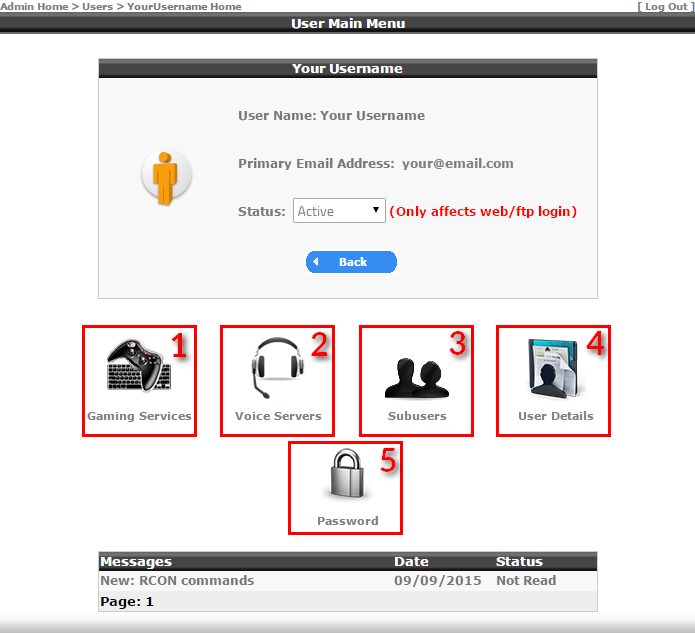
1) You can access your list of game servers
2) You can access your list of voice servers
3) You can set additional access to your control panel
4) You can change your personal information
5) Allows you to change your password
3) Click "Gaming Services" (No. 1 on the picture) and then access the list of your game servers as in this image :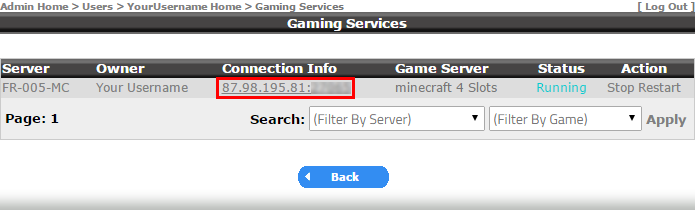
4) Click to your Server IP for access to its management
5) You arrive on this page that will allow you to manage your server details :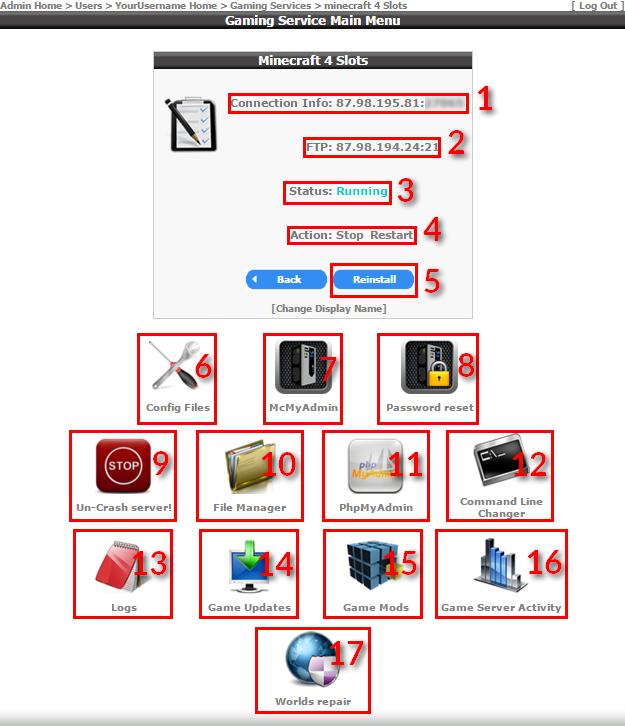
1) Your IP server connection (here intentionally hidden)
2) Your connection to the FTP adress
3) The current status of your server (Running, Stopped, Unknow or Disabled = Contactez us)
4) The main actions : Stop, Start, Restart
5) You can reset your server to its original state (very useful if you want to start on a sound basis). (HostName = Roxservers, RconPassword set your rcon password)
6) Allows you to access your server configuration files, you can edit files by clicking on « Edit » or on « Config Editor » If a config editor is available (Warning for most files it will be « Edit »and not « Config Editor » !)
7) Allows you to access on our second panel (ici for Minecraft) McMyadmin.
8) You can reset the password McMyadmin by the default password (it will be display on the window)
9) Allows you to fully stop your server, very useful in case of crash.
10) You can access a list of your files/folders from your server, you can edit files, delete folders / files, download files, upload files/zip. If you want to download a entire folder via the File Manager you will have to check it and click on "ZIP" you can then download the .zip. You can also use these actions using the FTP which is more convenient.
11) You can access the database included in your offer for Minecraft (same credentials that the panel)
12) For Minecraft: nothing, for other games : allows you to change certain aspects of the configuration by creating a new command line.
13) You can access and view/download your server logs
14) Allows you to install updates to your server (For Minecraft it will be all that is official versions, Bukkit, spigot, java etc ...)
15) Allows you to install changes in the type of your server (For Minecraft it will be all that is modpacks, forge, cauldron, mcpc etc…)
16) You can view the CPU and RAM activity in different periods of your server.
17) Minecraft only: allows you to attempt recovery of corrupted maps.
You now have all the turnkey to better manage your server, if you still have questions you can contact us