How to create a banner

To insert a banner in your teamspeak you must have :

- A teamspeak server

- A picture in the web

- You must have admin privilege

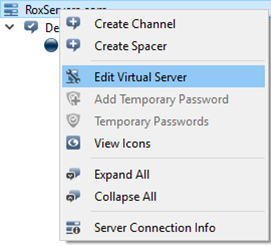
Once complete prerequisites you connect to your TeamSpeak server then right click on your server and then « Edit Virtual Server »

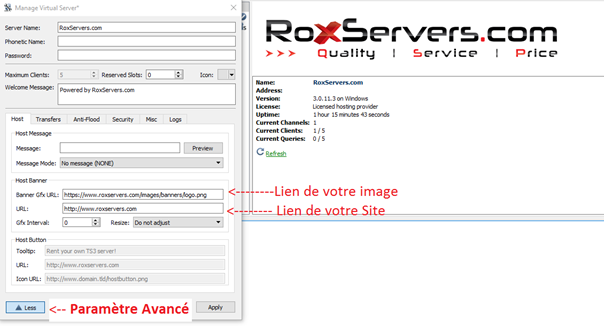
Insert in box « Banner Gfx URL : » your link exemple : https://www.roxservers.com/images/banners/logo.png

Y
ou can insert your website url in box : « URL : » it redirects the click of the banner on your website.

Result :
  • 4 Users Found This Useful
Was this answer helpful?

Related Articles

Générer une clé de privilège depuis le panneau de contrôle

Si vous avez changé de PC ou que vous l'avez formaté ou que pour toute autre raison vous n'êtes...

Display group as prefix or suffix

Make sure you are using advanced permissions in your teamspeak configuration:settings >...

Adding an admin

When your TeamSpeak server gets created you receive an email containing a privilege key also...

Put a password on TeamSpeak

Once your Teamspeak installed go to your Admin Panel.In the « Voice Servers » select your server...